
Download Small Mail Sender – email sender, bulk email, smtp, command line, html email, plain text, file import, android utility, productivity tool
Overview
Small Mail Sender is a lightweight, free productivity tool designed for users who need to send emails efficiently from their Android devices. The application addresses the common challenge of managing email distribution, particularly for users who require either single-message delivery or the ability to send bulk emails without relying on web-based platforms. It is especially useful for individuals managing newsletters, event announcements, or internal communications where speed and simplicity are essential.
Targeted at both casual users and technically inclined individuals, Small Mail Sender offers a streamlined experience for email management. Its core functionality centers on importing recipient email addresses from files, enabling users to distribute messages to multiple contacts with minimal effort. This feature is particularly valuable in scenarios such as school notifications, small business promotions, or community updates. The app operates as a standalone utility, reducing dependency on email clients with complex interfaces or limited automation options.
Although the developer did not provide additional background information, the app’s long-standing presence since its release on March 13, 2013, suggests a stable and reliable foundation. Its continued availability on Android underscores its relevance in the mobile productivity ecosystem. For users seeking a no-frills, efficient email sender that integrates seamlessly into daily workflows, Small Mail Sender offers a focused solution tailored to specific communication needs.
Key Features & Functionality
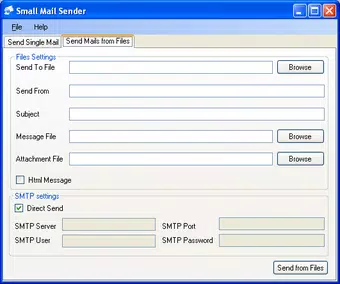
- Single & Bulk Email Sending: Send individual messages or distribute emails to multiple recipients by importing address lists from files. This feature simplifies the process of broadcasting information to groups without manual entry.
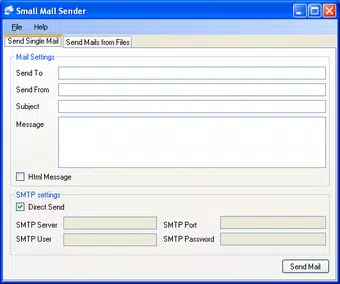
- SMTP Server Integration: Users can send emails directly through the app or configure custom SMTP servers for improved delivery control and reliability, especially useful for business or personal domains.
- HTML or Plain Text Message Options: Craft emails using either rich HTML formatting for visually engaging content or plain text for simplicity and broader compatibility across email clients.
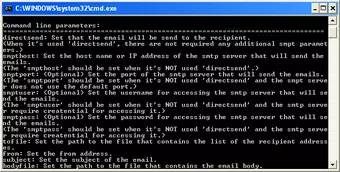
- Command Line Support: Advanced users can leverage command line functionality to automate email tasks via batch files, enabling scheduled or scripted email campaigns.
- User-Friendly Interface: The app features an intuitive layout that allows users of all technical levels to set up and send emails quickly, minimizing the learning curve.
For example, a teacher could import a list of parent email addresses from a CSV file to send a class update. A small business owner might use the command line to schedule weekly newsletters. The combination of file import, format flexibility, and automation makes Small Mail Sender a versatile tool for real-world communication tasks.
Interface, UX & Performance
Small Mail Sender presents a clean, minimal interface designed for efficiency rather than visual flair. The layout prioritizes functionality, with clearly labeled fields for recipient input, message content, and SMTP configuration. Navigation is straightforward, allowing users to progress through the email setup process with few steps.
The app’s design reflects its utility-first philosophy—there are no distracting animations or complex menus. This simplicity enhances usability, particularly for users who value speed and direct access to core features. While the developer did not list formal performance metrics, the app’s lightweight size of 1.8MB suggests optimized resource usage, which typically correlates with smooth operation on a wide range of Android devices.
Although the developer did not specify minimum OS requirements, the app’s long-standing availability on Android indicates broad compatibility across various device categories. Responsiveness appears consistent with its design philosophy, ensuring that actions like file import and message sending are executed promptly. Stability is likely maintained through years of use, though users should be aware that no official updates have been documented since its initial release.
Platform Compatibility & Technical Requirements
Small Mail Sender is available exclusively on the Android platform. The current version is 2.1, with a file size of 1.8MB, making it suitable for devices with limited storage capacity. The app was released on March 13, 2013, indicating a mature product with a long history of service.
Although the developer did not specify minimum OS requirements, the app’s age and lightweight nature suggest it may function on older Android versions. However, compatibility with newer Android releases cannot be guaranteed without official confirmation. Users should verify device compatibility before installation, particularly if running a recent OS version.
Given the app’s file size and platform specificity, it is well-suited for budget smartphones and devices with modest hardware. The absence of cloud dependencies or background services contributes to its low system impact.
Pros and Cons
Pros
- Free to download and use with no hidden costs.
- Supports both single and bulk email sending via file import.
- Offers HTML and plain text message formatting options.
- Includes command line interface for automation and scripting.
- Lightweight design with minimal system resource usage.
- Intuitive interface suitable for users of all technical levels.
Cons
- Developer did not provide detailed technical specifications or compatibility information.
- No recent updates or active development indicated since 2013.
- Command line features may be challenging for non-technical users.
- File import functionality may be limited to specific formats without documentation.
- Compatibility with modern Android versions is uncertain.
FAQ
Is Small Mail Sender safe to install on Android?
Yes, the app is free and available through trusted channels. However, users should ensure they download it from official sources to avoid potential security risks.
Can I use Small Mail Sender without an internet connection?
No, the app requires an active internet connection to send emails via SMTP or other servers.
Does Small Mail Sender support email templates?
The developer did not provide information about template support. Users may need to manually enter or copy message content.
Is Small Mail Sender compatible with iOS devices?
No, the app is currently available only for Android. There is no official iOS version.
How do I import recipient email addresses into the app?
Users can import email addresses from files, though the supported file types were not specified in the provided information.
Final Thoughts
Small Mail Sender remains a niche yet functional tool for Android users seeking a straightforward way to send emails, especially in bulk. Its combination of file import, format flexibility, and command line automation makes it a valuable asset for specific workflows. While its age and lack of recent updates raise concerns about long-term compatibility, its lightweight design and free status continue to offer real value.
Those who need a no-frills email sender for personal or small-scale professional use will find it effective. It excels in environments where simplicity, efficiency, and minimal resource use are priorities. For users requiring advanced email management, it may serve as a supplemental tool rather than a primary solution.
Despite its limitations, Small Mail Sender delivers on its core promise: sending emails quickly and reliably. Download Small Mail Sender now


